Staffing firms lose valuable time when recruiters and coordinators rely on manual call handling, disconnected systems, and repetitive data entry. Staffing call workflow automation with CTI can streamline candidate and client interactions, automate routine tasks, and keep call data connected to recruiting workflows. This blog explores how CTI workflows can reduce administrative effort, accelerate candidate submissions, and cut time-to-submit.
- 1Automate call workflows using Salesforce CTI to intelligently route calls based on issue category, customer type, and agent skills.
- 2Implement Screen Pop to instantly display customer information upon incoming calls, reducing manual search time for agents.
- 3Streamline service request creation by integrating call data directly into Salesforce records, providing crucial context.
- 4Address call surges effectively by leveraging automated workflows and intelligent routing to prevent agent overwhelm.
- 5Connect telephony with Salesforce to create a unified environment for customer information, service requests, and agent actions.
Finding a qualified candidate that matches the job description is the first part of the staffing process; the actual difficulty is keeping the process ongoing even after finding a suitable candidate.
The time spent on screening the candidate through a phone call may last a few minutes, but the tasks, like capturing candidate information, documenting qualifications, updating records, or creating follow-ups, are usually longer.
Manually performing all these tasks can lead to a significant gap between screening and submission.
But what if these post-screening call tasks were performed automatically?
This is the concept of staffing call workflow automation, where CTI workflows are used to automate the tasks done after a screening call in the staffing process.
Top 5 Advantages of a Candidate Screening Workflow in Salesforce
Connecting screening calls with the entire recruitment process helps recruiters get more value from every single conversation without any additional workload on them.
Connecting workflow can bring several benefits for staffing agencies:
- Reduction of post-call activities: The key information about candidates can be recorded during the conversation without any need to rewrite it all.
- Up-to-date Salesforce records: Screening data can be transferred to the candidate's record so that recruiters have an idea of where every candidate is.
- Making follow-up easier: Recruiters will easily determine the next step without any additional notes or reminders.
- Consistency in call outcomes: There will be a clear recruiter call disposition helping teams decide what to do with the candidate (follow up, reject or proceed).
- Faster processing of candidates: Having less administrative tasks, recruiters can concentrate on reviewing and submitting candidates before the opportunity expires.
For staffing agencies, these advantages are crucial. It's not about automating the screening call itself; the important thing here is to cut the gap between screening, qualification and submission.
What If Every Screening Call Moved a Candidate Closer to Submission?
See how GirikCTI turns screening calls into connected Salesforce workflows. Click Here!
From Screening Call to Candidate Submission: The Candidate Screening Process
An ideal candidate's screening process does not stop once the call is disconnected. Information collected through the screening process should be used to determine what to do next, even if the recruiter controls that decision.
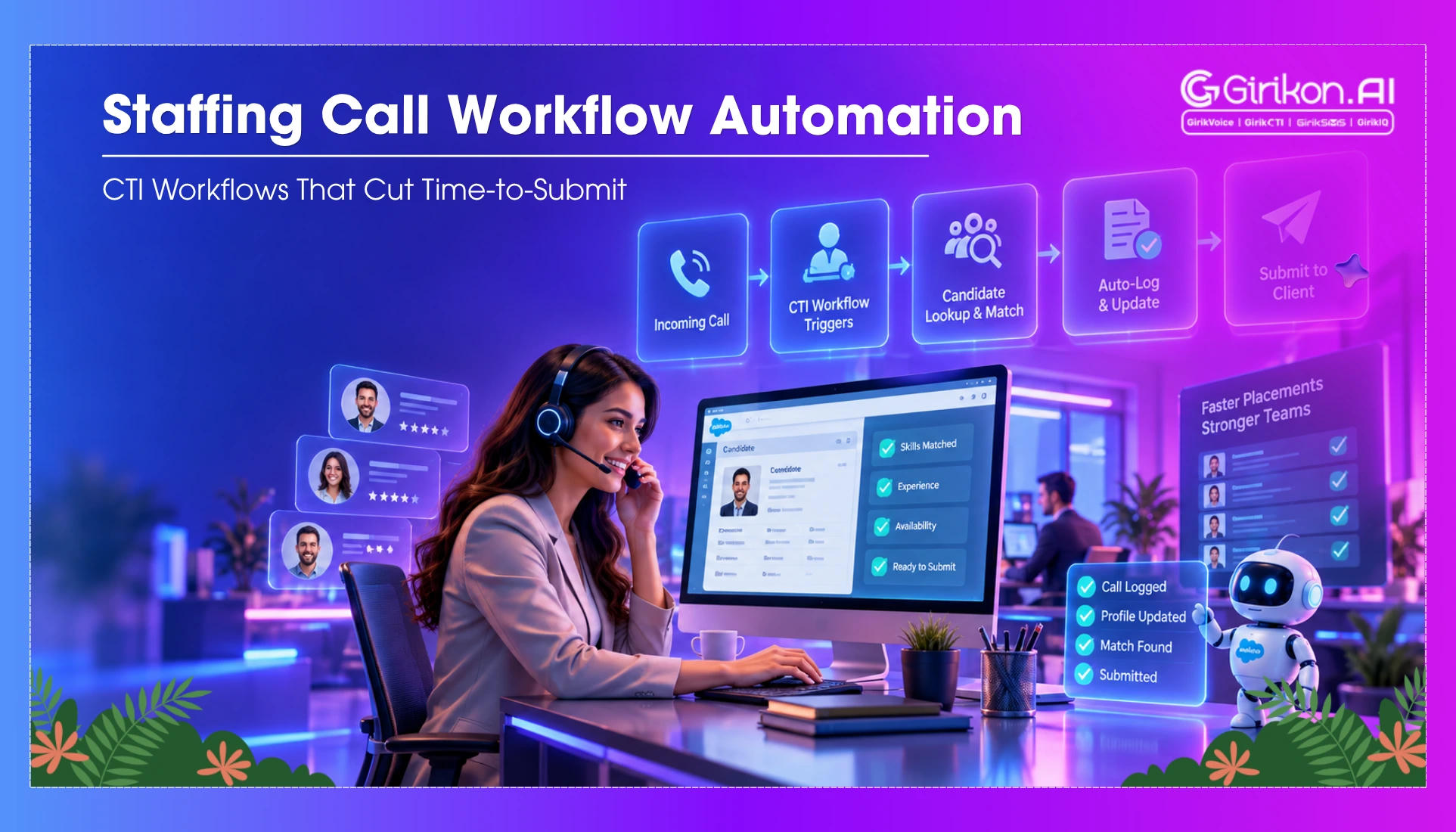
This is how a connected candidate screening workflow in Salesforce should work to move the potential hire forward from the initial screening call until the submission process.
- The Recruiter Begins with the Candidate's Record
A screening process will start by opening the candidate's Salesforce record. By then, the recruiter would have been aware of the candidate's record, his resume, the role's requirements, and the interaction history.
- The Screening Call Begins in Salesforce
The recruiter will be able to make the call from Salesforce using CTI without switching to another app for making calls. The call will stay connected to the candidate’s record, keeping the conversation within the recruiting workflow.
- The Conversation Is Recorded
Once the phone call is made, the recruiters can begin by transcribing the phone call. AI can help summarize and make notes of the phone call to capture necessary information.
- Candidate Details Are Added to Salesforce
The information collected during the phone call can be used to update the candidate’s record. The skill set, work experience, availability, salary expectations, and other information can be collected through this process.
Rather than keeping any essential information about the candidate in their personal notes, the recruiter makes sure that the recruiting team has access to the information.
- The Recruiter Decides What to Do Next
The recruiter then decides what the conversation means for the candidate. The recruiter call disposition can tell if the candidate is qualified, requires further contact, needs more information, or should not proceed any further.
This will ensure clarity in the process and give direction to the recruiter.
- Next Action is Created
If the candidate is a potential fit, then the workflow can help create the next action item. It can be the next call, documentation, or interview that needs to be performed before submitting.
It is not necessary for the recruiter to conclude the call, remember the next action, and then create it separately later.
- Candidate is Navigated to Submission
Now that the candidate has been successfully screened and qualified, they can finally move to the submission stage.
What to Look for in a Staffing Call Workflow
An ideal call process workflow is much more than the process of connecting the call to Salesforce. It must help the recruiters move the process forward after every call.
Features like:
- Salesforce-native calling without changing between different apps.
- Auto-call capturing via call recording, transcription, and summaries.
- Call disposition and automated follow-up of recruiters' calls.
- Use of AI, including voice AI assistants for appropriate screening activities.
- Connected candidate records so important call information stays accessible to the recruiting team.
The goal is simple: make every screening call contribute to the next recruiting step.
Concluding Words
Screening calls are important, but the work that comes after will decide how fast a qualified candidate reaches the client. The integration of calling and recruiting processes in Salesforce enables recruiters to do more than just perform post-call activities.
Staffing call workflow automation makes each call an automated process from beginning to end—from making the call to updating the candidate.
So, how much faster would your staffing team move qualified candidates along if each screening call was automatically followed by the next process?